Station Spots
See who is being heard, where the signal landed and what the band is doing.
A spot is a radio sighting
Stations and automated receivers around the world report signals they hear. Those reports—called spots—show a callsign, frequency, mode, receiving station and time. They offer a near-real-time picture of activity and propagation without requiring you to transmit.
What can a spot tell you?
A single report says that one receiver heard one station at a particular moment. A pattern of reports across several bands, places and times can reveal changing propagation, where a signal is reaching and which modes are active.
20M · FT8 · 14.075 MHz
HEARD BY: N3FWE
TIME: 21:46 UTC
How to read the live list
Callsign
The station whose signal was detected. K5NWZ is my amateur-radio callsign.
Band and frequency
These show where the transmission appeared in the radio spectrum.
Mode
FT8, CW, voice and other modes use different methods to carry information.
Spotter and time
The spotter heard the signal; the timestamp shows exactly when it happened.
This means receiver N3FWE reported hearing K5NWZ using FT8 near 14.075618 MHz on the 20-meter amateur band. It shows reception—not necessarily a completed two-way contact.
Live station reports
| Callsign | Band | Mode | Frequency | Spotter | Timestamp |
|---|---|---|---|---|---|
| W0WAL | 20m | ft8 | 14.07652 | K5NWZ | 2026-10-18 03:55:38 |
| W0WAL | 30m | ft8 | 10.138452 | W5QJ | 2026-10-18 03:42:20 |
| W0WAL | 20m | ft8 | 14.07645 | ZW50B | 2026-10-18 03:34:35 |
| W0WAL | 30m | ft8 | 10.13839 | LA7HJA | 2026-10-18 03:20:32 |
| W0WAL | 20m | ft8 | 14.074 | K1RA-4 | 2026-10-18 03:07:19 |
| W0WAL | 40m | ft8 | 7.07621 | AJ9BM | 2026-10-18 02:52:18 |
| W0WAL | 40m | ft8 | 7.075745 | VA5KEN | 2026-10-18 02:37:18 |
| W0WAL | 40m | jt | 7.091749 | KC2DAC | 2026-10-18 02:30:56 |
| W0WAL | 20m | jt | 14.091747 | K3FEF | 2026-10-18 02:28:56 |
| KI6NAZ | 40m | ft8 | 7.076459 | N2BJ | 2026-10-18 02:12:07 |
| KI6NAZ | 40m | ft8 | 7.076441 | K4TMR | 2026-10-18 01:57:05 |
| KI6NAZ | 40m | ft8 | 7.074747 | KN7AHS | 2026-10-18 01:42:02 |
| KI6NAZ | 40m | ft8 | 7.076089 | KD7H | 2026-10-18 01:26:21 |
| W0WAL | 40m | ft8 | 7.076035 | KB9FIN | 2026-10-18 01:23:52 |
| KB9VBR | 30m | ft8 | 10.136204 | K2KN | 2026-10-18 01:16:21 |
| W0WAL | 40m | ft8 | 7.074 | VE6AO | 2026-10-18 01:08:50 |
| W0WAL | 15m | ft8 | 21.076145 | JI3ERY | 2026-10-18 01:02:30 |
| KB9VBR | 30m | ft8 | 10.136 | N2CR | 2026-10-18 01:01:19 |
| W0WAL | 12m | ft8 | 24.915 | JI1HFJ | 2026-10-18 00:47:29 |
| KB9VBR | 30m | ft8 | 10.136 | K1HTV-4 | 2026-10-18 00:46:05 |
| W0WAL | 12m | ft8 | 24.916957 | JA2LWA | 2026-10-18 00:30:31 |
| W0WAL | 12m | ft8 | 24.916952 | KFS/NW | 2026-10-18 00:15:27 |
| W0WAL | 12m | ft8 | 24.917037 | JA2LWD | 2026-10-17 23:59:51 |
| W0WAL | 12m | ft8 | 24.917038 | N3VLF/4 | 2026-10-17 23:44:51 |
| KI6NAZ | 20m | ft8 | 14.075 | VA6VZ | 2026-10-17 23:42:19 |
| W0WAL | 12m | ft8 | 24.915 | KM3T-2 | 2026-10-17 23:29:48 |
| KI6NAZ | 20m | ft8 | 14.074018 | WI4B | 2026-10-17 23:15:46 |
| W0WAL | 12m | ft8 | 24.916465 | JA9FFS | 2026-10-17 23:14:27 |
| W0WAL | 20m | ft4 | 14.080 | KM3T-3 | 2026-10-17 22:58:15 |
| KI6NAZ | 20m | ft8 | 14.074 | K7CO | 2026-10-17 22:57:59 |
| KI6NAZ | 40m | ft8 | 7.074609 | K5VW | 2026-10-17 22:57:48 |
| W0WAL | 12m | ft8 | 24.917079 | WA1HXH | 2026-10-17 22:57:04 |
| KI6NAZ | 40m | ft8 | 7.074 | NG7M | 2026-10-17 22:42:20 |
| W0WAL | 20m | ft4 | 14.080702 | KD2M | 2026-10-17 22:40:54 |
| W0WAL | 20m | ft2 | 14.086274 | N4HAC | 2026-10-17 22:38:59 |
| W0WAL | 30m | ft8 | 10.136 | K7CO | 2026-10-17 22:26:02 |
| KB9VBR | 20m | ssb | 14.333 | KG2MM | 2026-10-17 22:16:19 |
| KI6NAZ | 20m | ft8 | 14.076382 | VE5SD | 2026-10-17 21:59:23 |
| KB9VBR | 20m | ssb | 14.333 | KB9VBR | 2026-10-17 21:58:19 |
| K5NWZ | 20m | ft8 | 14.075947 | AD2NU | 2026-10-17 21:58:12 |
| KI6NAZ | 20m | ft8 | 14.074 | K7CO | 2026-10-17 21:44:23 |
| K5NWZ | 20m | ft8 | 14.075944 | VE1AEB/W7 | 2026-10-17 21:43:04 |
| KD0YOB | 2m | fm | 146.580 | KD0YOB | 2026-10-17 20:50:00 |
| KD0YOB | 2m | ssb | 144.200 | KD0YOB | 2026-10-17 20:41:30 |
| KD0YOB | 30m | cw | 10.112 | AC0C | 2026-10-17 20:27:30 |
| KD0YOB | 15m | cw | 21.063 | N2EPE | 2026-10-17 20:11:30 |
| KD0YOB | 17m | cw | 18.094 | WB6BEE | 2026-10-17 20:09:30 |
| KD0YOB | 17m | cw | 18.094 | VE6JY | 2026-10-17 19:50:30 |
| KF0RUA | 20m | ssb | 14.349 | KF0RUA | 2026-10-17 19:42:29 |
| KD0YOB | 40m | cw | 7.034 | W6YX | 2026-10-17 19:37:30 |
Parks on the Air right now
Parks on the Air, or POTA, puts portable amateur-radio operators in parks and public lands. These live spots tell you who is operating, where they are, and which frequency to try. Colorado activations are highlighted. Listen first; if you are licensed and can hear the activator, answer their call.
MOUNTAIN ACTIVITY • COLORADO & WYOMING
Summits on the Air: listen for operators above the noise
Summits on the Air (SOTA) encourages amateur-radio operators to carry a station to a qualifying summit and make contacts from the mountain. These activators may be running a handheld radio and a simple antenna, so a fresh spot can be the difference between hearing them and missing them.
This is the national 2-meter simplex calling frequency. No repeater is involved: both stations transmit and receive on the same frequency.
The dedicated SOTA table below shows Colorado and Wyoming summit activations. Every live row is clearly labeled, and newer reports are the best chance for a contact.
Activators also use 40, 30, 20, 17 and other bands. Check the listed band and mode before tuning so the radio is set correctly.
New to this? Tune 146.520 MHz in FM mode, turn off any repeater offset and listen. If an activator is calling CQ SOTA, answer with your callsign and signal report. Mountain activity is intermittent, so an empty moment does not mean the feed is broken.
| ACTIVATOR | SUMMIT | FREQUENCY | MODE | AGE |
|---|---|---|---|---|
| PAST SOTA ACTIVATIONKF0RUA | Strand Hill W0C/WE-099 · Colorado | 14.342 MHz | — | 2h 28m |
The dedicated live table shows a bright SOTA ACTIVATION label, the activator callsign, summit name and reference, location, frequency, mode and running age. The newest report appears first; older activations remain visible until 20 newer entries replace them.
The SDR is especially useful for HF summit activity within reception range of Northern Colorado. Tune the exact frequency and mode shown in a fresh report. The current SDR does not cover 146.520 MHz, so local 2-meter simplex requires a VHF radio or scanner.
What can I hear right now?
These are spots: reception reports sent by stations that heard a signal. The “Heard by” station may be anywhere in the world, so a spot does not guarantee that the K5NWZ receiver in Colorado can hear the same station. Conditions, distance, antenna coverage and propagation are different at every location.
Use the frequency and mode as a starting point. The Tune SDR button opens the receiver at that reported frequency, but the signal may be gone or may never reach this station.
| Frequency | Band / mode | Station | Heard by | Why try it | Age | Listen |
|---|---|---|---|---|---|---|
| Building a current tuning list… | ||||||
Where are those signals traveling?
Each line is a real reception report from the live station list. The transmitting station is the green end; the reporting receiver is the blue end. A longer line does not automatically mean a stronger signal—it shows how far that particular report traveled.
What should I try right now?
This quick read turns the spot stream into a starting point. It looks at fresh reports from the last hour so a newcomer can choose a band with activity instead of guessing.
What are the bands doing right now?
This reads recent reports for the stations tracked on this page. It is a practical clue—not a guarantee that a band is open everywhere.
The page is counting reports from the last hour.
Higher bands often improve after sunrise. If 10 meters is quiet, work downward through 15 and 20 meters.
Lower bands often become more useful after sunset, although noise and changing conditions still matter.
Newcomer tip: Start with the band showing the freshest activity, select the correct mode, then use the SDR waterfall to look for signals near the reported frequency.
Could two meters be open farther than normal?
This forecast shows atmospheric conditions that can extend 144 MHz and other VHF/UHF signals beyond normal line-of-sight range. Look for a colored path running through Northern Colorado in the direction you want to work. For confirmation using actual two-meter reports, use the live APRS map below the forecast.
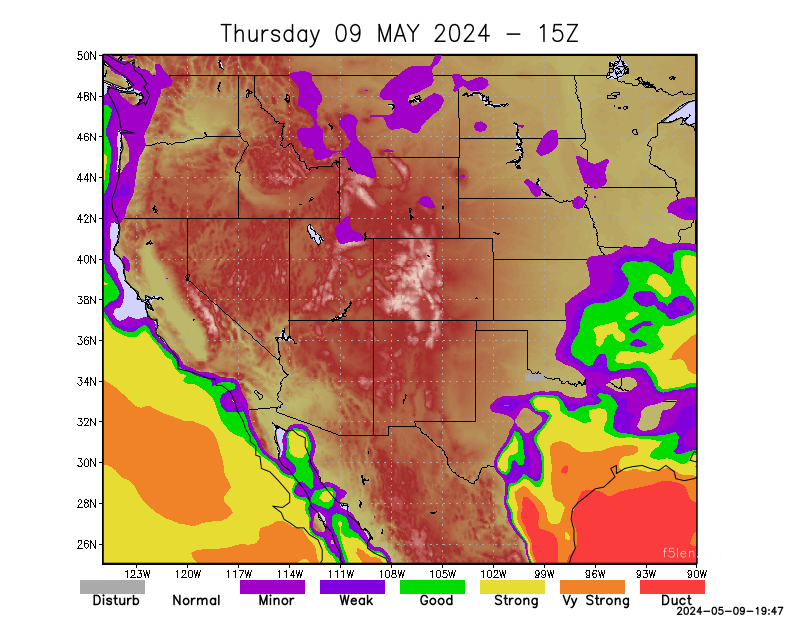
On the live map, the “6m” marker is a six-mile distance scale—not the six-meter amateur band.
Where do spots come from?
Automated receivers
Internet-connected receiving stations decode modes such as FT8 and report what they hear to large spotting networks.
Operators and clusters
Radio operators and DX clusters can publish reports about stations active on voice, CW and digital modes.
Alerts and filters
Spotting and alert services collect reports and filter them by callsign, band, mode or other rules so the most useful activity is easier to follow.
What spots are useful for
Watch propagation change
Compare reports by time, band and location. Higher bands may open during daylight, while lower bands often improve after dark—but real conditions change constantly.
Find activity worth hearing
A fresh spot can point you toward an active frequency. Open the K5NWZ SDR in another window, choose an appropriate receiver profile and look for the signal on the waterfall.
Keep exploring
Follow the signal from the spotting network to the receiver—and then to the station log.