Home Assistant: the hub behind the radios, sensors and workshop
One local system brings the K5NWZ station together—from lights, doors and cameras to packet radio, APRS, Meshtastic, MeshCore, weather, the SDR and the 3-D printer.
Powerful software without a required subscription
Home Assistant is free and open-source software. There is no subscription required to run it, no software feature paywall, and no limit on the number of devices, dashboards or automations you can build. It is maintained as a project of the nonprofit Open Home Foundation, with local control, privacy and user choice at the center of the project.
Start with hardware you already have
Home Assistant can run on the plug-and-play Home Assistant Green, a Raspberry Pi, a small x86-64 mini PC or NUC, a virtual machine, or as a Docker container on a Linux system. Home Assistant OS is the easiest and officially recommended installation for most people because it manages updates, backups and apps from the interface.
Designed to connect unlike equipment
Official documentation lists more than 1,500 integrations and support spanning over 1,000 brands. It can unite devices that would otherwise remain trapped in separate manufacturer apps, while local protocols such as Zigbee, Z-Wave, Matter, Thread and ESPHome can continue working without an Internet connection.
Most work happens in the interface
You do not have to begin by writing code. Devices, dashboards and automations can be built through the graphical interface. Advanced users can still go much deeper with templates, custom dashboards, community integrations and their own software bridges.
Pay only for what you choose
You still need a computer or hub to run it, and radios or adapters may be needed for protocols such as Zigbee or Z-Wave. Home Assistant Cloud is an optional paid service for convenient remote access and voice-assistant connections; it is not required for the core system.
Official free and open-source FAQ ↗Installation and getting started ↗Browse integrations ↗
What does Home Assistant actually do?
A typical “smart” device has its own app. After a while, that means one app for cameras, another for weather, another for lights and another for the garage. Home Assistant replaces that pile of disconnected apps with one control center. It sees each useful piece of information as an entity: a temperature, door state, radio message, battery level, camera image or switch. Those entities can be displayed, recorded and used in automations.
One dashboard
Current conditions, radio traffic, cameras, doors, temperatures, equipment health and alerts are arranged around the job—not the brand name on the box.
Useful logic
Automations combine triggers, conditions and actions. The system can distinguish “a door changed” from “a door is still open at bedtime.”
Phone and tablet access
The same custom dashboards work at the station or through the Home Assistant mobile app, including actionable notifications when something needs attention.
From a 1980s packet terminal to a phone anywhere
This is where Home Assistant becomes much more than home automation. K5NWZ uses a real packet-radio TNC and radio, then bridges the serial terminal, mailbox activity and controls into Home Assistant. A technology associated with 1970s and 1980s computer terminals becomes a modern mobile interface.
Receives and sends AX.25 packet data over RF
Supervises the connection and translates terminal activity
Messages, mailbox tools, status and notifications from almost anywhere
The custom interface shows connection state, last activity, recent traffic, MHEARD stations and packet mail. It can initiate a connection, send text, check the mailbox and alert the phone when a new packet message arrives.
One control surface for several radio worlds
Meshtastic
Custom dashboards organize heard nodes, names, RF paths, SNR, battery, environmental telemetry, message history and mapped positions. Direct and private messages can create immediate iPhone alerts, while local operation continues even if the internet is unavailable.
MeshCore
Saved and discovered contacts, search tools and incoming direct messages are brought into the same station dashboard. That makes the radio network easier to use without hiding what is happening over RF.
APRS
Decoded packets become callsigns, paths, messages and positions. K5NWZ custom map cards turn that raw data into a readable live picture of local activity and make it possible to send an APRS message from the dashboard.
OpenWebRX and SDR
Home Assistant monitors receiver sessions, current listeners, listening time and chat activity. It can notify the station when a listener connects while the public SDR remains a separate, purpose-built listening interface.
Control it from the interface that fits the moment
Home Assistant is the brain of the K5NWZ system, but it does not force everyone to use one screen. The same devices, scenes and automations can be reached from several familiar interfaces while Home Assistant keeps the logic and state consistent underneath.
Siri and Apple devices
Selected controls and scenes can be exposed to Siri and Apple Home, while the Home Assistant app provides the complete dashboards, notifications and detailed sensor history.
Google Home and Alexa
Familiar voice assistants can provide convenient everyday commands without becoming the master copy of the automation logic. Home Assistant remains the coordinating layer.
Phones, tablets and displays
The station can be reached from the iPhone, iPad, computers, dedicated wall displays and purpose-built dashboards. Physical buttons and automatic triggers still work when a screen is not the right tool.
The familiar smart-home jobs still matter
Doors and security
Garage doors and labeled door sensors report open and closed states. Changes generate phone and tablet notifications, and an evening security check identifies anything still open—or anything the system cannot verify.
Cameras and live video
Local camera streams use low-latency WebRTC/go2rtc viewing. Cameras can support security, equipment checks and workshop monitoring without forcing every view through a public website.
Temperatures and comfort
Weather-station measurements and indoor sensors support dashboards, history and practical decisions. One automation watches temperature, humidity and forecast trends to suggest when to open or close the windows.
Lights, switches and climate
Devices from different ecosystems—including fans, plugs, lighting and climate equipment—can participate in the same scenes and automations instead of remaining isolated in separate apps.
Bambu Lab A1
The printer becomes part of the workshop dashboard: job state, progress, material information, camera monitoring and time-lapse media can be checked alongside the rest of the station.
Personal weather station
The K5NWZ WS-2000 feeds live temperature, humidity, pressure, wind, gust, rain, solar and UV data into the same system used by the house and station automations.
Trigger → condition → action
A door opens, a packet message arrives, weather changes or motion is detected.
Is it after dark? Is anybody home? Is the reading fresh? Is this a private radio message?
Send a phone alert, update a dashboard, operate a device or record the event.
This logic is why Home Assistant feels different from a universal remote. It does not merely put buttons on a screen; it combines context from different systems and responds in a way that is useful.
Useful decisions—not just remote-control buttons
The best automations quietly combine several facts before acting. These examples use real K5NWZ sensors, radios, forecasts, schedules and presence information to solve everyday problems.
Tell me when to open—or close—the windows
Every ten minutes, Home Assistant compares the K5NWZ outdoor temperature and humidity with the next three hours of forecast data. When the air is cool, dry and continuing to improve, the iPhone says it is a good time to open the windows. If temperature climbs above 70°F or humidity reaches 60 percent, a follow-up says to close them. Stale sensor readings are rejected so bad data does not create bad advice.
Warn me if I leave something open
Presence data can be combined with every labeled door and window sensor. When the house changes to away, Home Assistant can identify the exact opening that was left unsecured and send the warning to the phone—before an open garage door, patio door or window becomes an all-day problem.
Close the garage doors automatically
Both garage doors receive automatic close commands in the morning and evening, with a second pass two minutes later. Separate open-and-close notifications report every state change, and the 8 p.m. security check lists doors that are still open or cannot be verified.
Put light where it is needed
Patio lighting follows sunset and sunrise, selected room lights come on at dusk, and motion after dark can turn on a bedside light. The same pattern can control switches, fans and scenes: an event starts the automation, conditions decide whether it is appropriate, and only then does Home Assistant operate the device.
Bring unattended radios to the phone
New packet mail, private Meshtastic traffic and MeshCore direct messages create time-sensitive iPhone alerts with a path back to the correct dashboard. OpenWebRX listener and chat events can do the same for the public SDR.
Know when the bridge is really alive
Gateways publish heartbeat, last-activity and service-state information. That prevents an attractive screen from quietly displaying old information after a radio bridge, decoder or network service has stopped.
Small automations that solve real problems
Some of the most useful projects are not flashy. They remove a repeated chore, catch something easy to forget, or turn radio and sensor data into a timely decision. These are real examples from the K5NWZ system.
The “I’m up” morning routine
How it works: one deliberate morning action tells Home Assistant the day has started. It can bring the home out of its overnight state and make the right lights, information and devices available without firing several unrelated commands.
How it helps: a named routine is easier to understand and change than a pile of timers. The routine can evolve while the trigger stays simple.
Turn the coffee maker off automatically
How it works: Home Assistant watches the coffee-maker switch and its running time, then turns it off after the allowed period instead of depending on somebody remembering.
How it helps: it reduces wasted power and removes a familiar “Did I leave it on?” worry when leaving home.
Turn a mouse trap into a smart sensor
How it works: a small motion sensor reports activity at the kitchen trap. Home Assistant converts that event into a phone alert so the trap can be checked promptly.
How it helps: an inexpensive sensor becomes a practical notification device; there is no need to keep checking the trap manually.
Know when family arrives or leaves
How it works: approved presence information changes the home between occupied and away states and can send a simple arrival or departure notice.
How it helps: presence gives other automations context. A door opening while somebody is home is different from a door left open after everyone has departed.
Run outdoor and room lighting at the right time
How it works: patio lights, a bedside light and selected room lamps follow sunset, sunrise, schedules and motion instead of fixed clock times alone.
How it helps: the behavior automatically follows changing daylight through the seasons and still keeps each light available for manual control.
Watch the public SDR without babysitting it
How it works: OpenWebRX sends listener, session and chat activity into Home Assistant. The system keeps recent history, calculates listening statistics and can send an alert or a Discord announcement when activity matters.
How it helps: I can see whether the receiver is being used and respond to visitors without leaving the receiver screen open all day.
Make MeshCore contacts usable
How it works: custom search tools filter saved and newly discovered contacts, preserve the selected result and carry that choice into the message workflow.
How it helps: a growing radio contact list becomes easy to search on a phone. The dashboard keeps the RF details visible while removing repetitive scrolling and re-selection.
Send Meshtastic messages from one dashboard
How it works: Home Assistant combines destination selection, channel choice, message entry, send controls and recent traffic. Private incoming messages can create an immediate iPhone notification with a route back to the correct view.
How it helps: the radios remain an independent off-grid mesh, while the dashboard makes the network easier to operate and study when the station interface is available.
Supervise the Bambu Lab A1
How it works: printer state, job progress, temperatures, filament information, camera monitoring and time-lapse media are collected on the workshop dashboard.
How it helps: a long print can be checked without standing beside the printer, and a stopped or completed job is visible alongside the rest of the home and station.
Detect stale data instead of trusting a pretty screen
How it works: radio bridges and custom services publish heartbeats, last-activity times and availability. Home Assistant compares those timestamps with expected reporting intervals.
How it helps: a map or status card cannot quietly keep showing old data after a decoder, gateway or connection has failed. Late and stale become visible conditions that can trigger maintenance alerts.
Different screens for different jobs
There is no single overloaded smart-home screen. K5NWZ uses purpose-built dashboards that put the information and controls for one job together.
Home overview
A fast whole-property summary: favorite controls, room status, garage doors, weather, security, cameras and anything that needs attention.
Ham Shack
Meshtastic, MeshCore, APRS and packet-radio tools live together with RF status, messages, node lists, signal diagnostics, TNC controls and mailbox activity.
Weather
The WS-2000 becomes a data dashboard with live temperature, humidity, wind, rain, pressure, solar and UV readings plus trends and history. Those values also feed automations instead of merely filling graphs.
Security and cameras
Live cameras, PTZ controls, garage doors, exterior doors, windows and recent history share one view. The dashboard shows both what is happening now and when a sensor changed.
3-D printer and workshop
The Bambu Lab A1 dashboard brings together job state, percentage complete, material, temperatures, camera monitoring and time-lapse media. Maintenance and Hobby Shop views track the supporting equipment.
System maintenance
Unavailable devices, low batteries, stale data and bridge health belong on their own technical view, keeping routine troubleshooting out of the everyday dashboards.
What the working system looks like
These are current screenshots from the real K5NWZ Home Assistant installation—not generic product images. Each dashboard is arranged around a job so the useful information is visible without opening several manufacturer apps.


From radio packets to a moving operational picture
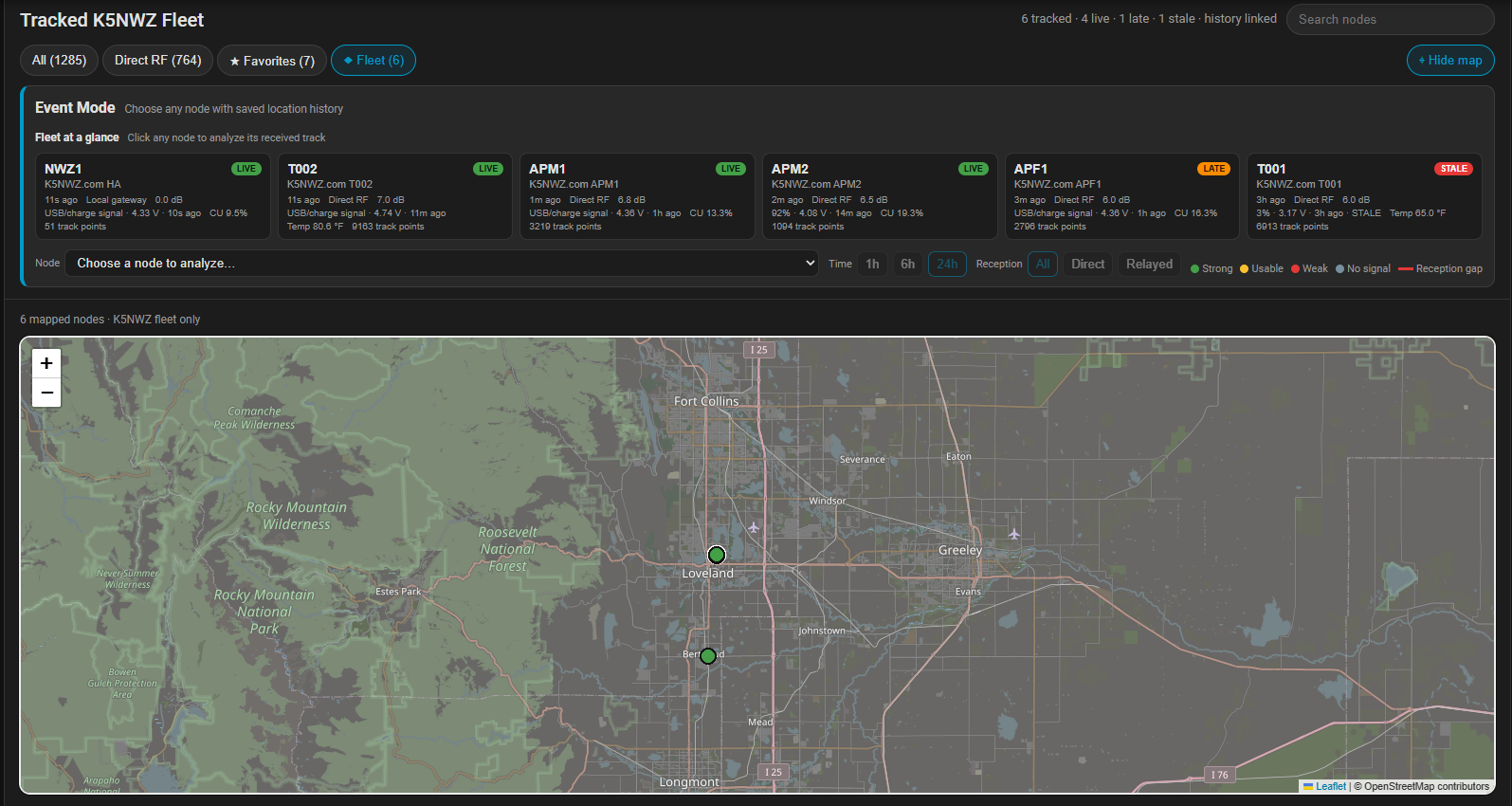
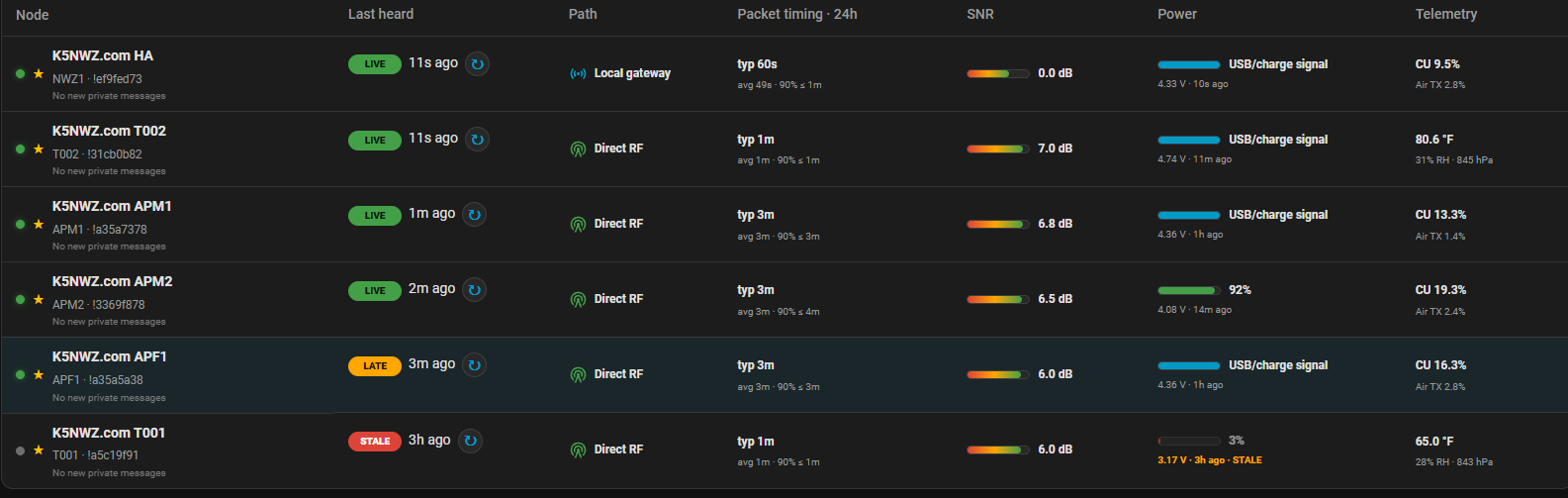
The tracking project is a strong example of Home Assistant acting as an information hub. GPS-equipped Meshtastic nodes—or nodes receiving position from a paired phone—report over the off-grid LoRa mesh. K5NWZ collects those reports, separates direct RF from gateway traffic, watches timing and telemetry, and turns the data into a fleet view that can be used from a computer or phone.
Receive the report
A node transmits its position, battery and optional environmental telemetry. Another node may relay it when terrain blocks a direct path.
Measure reliability
The dashboard records last-heard time, typical reporting interval, RF path and signal-to-noise ratio rather than treating every marker as equally current.
Build history
Saved locations form a breadcrumb trail. During a field test, a route can be reviewed and a missing or stopped node has a meaningful last-known path—not just one final dot.
See the field-tracking project →Learn Meshtastic and MeshCore →
You do not have to automate the whole house
A good first Home Assistant project is deliberately small. Start with one problem you already understand: a temperature you want to graph, a garage door you want to verify, a light you want to schedule or a radio service you want to monitor.
Use Home Assistant Green, a small dedicated computer or another supported system.
Connect a device or service and learn its entities before building a complicated dashboard.
Choose a clear trigger, add only necessary conditions and make the resulting action easy to verify.
Private by default; public only on purpose
The full K5NWZ Home Assistant installation is not a public control panel. It contains household status, cameras, device controls and operational details that belong on a protected local system. Selected read-only information—such as weather, radio activity or carefully prepared screenshots—can be published to K5NWZ.com without exposing private controls or credentials.
Follow the part that interests you
Home Assistant is the connecting layer, but each project has its own beginner-friendly guide and live examples.
Open Live Now →Explore amateur radio →Field systems and remote ops →