K5NWZ • WINLINK RADIO EMAIL
Send and receive email over ham radio
Winlink lets you send and receive real email by radio — even when the internet is down where you are. You can also try the whole system over the internet with no radio at all. This page explains what Winlink is, how to set it up from scratch, and how to reach my gateway here in Loveland, Colorado.
THE BASICS
What is Winlink?
Winlink is email that travels by radio. With a radio and a small modem, your computer hands your message to a nearby Winlink gateway station. That gateway drops it into the Winlink network, which delivers it to any ordinary email address — your friend on Gmail never has to know it arrived by radio. Replies come back to you the same way.
The useful part: you do not need internet, a cell signal, or an email provider at your location. The radio link covers the last leg. That is exactly why emergency groups like ARES keep Winlink ready for when the power, the internet, or the cell towers go down.
Winlink is run by volunteer ham radio operators and it is free to use. The gateway stations are called an RMS (Radio Message Server); big central servers tie the whole network together. Once you have a free account, your email address is simply YOURCALL@winlink.org, built from your FCC callsign.
PICK YOUR PATH
Three ways to connect
There is more than one way into Winlink, and you can mix them. Most people start with the no-radio option to learn the software, then add a radio.
- Over the air to a gateway (like my K5NWZ-10). Your radio reaches the gateway; the gateway has the internet. Nothing at your end needs to be online. This is the real reason Winlink exists.
- Telnet, over the internet — no radio at all. Your computer connects straight to the Winlink servers over your home internet. This is the easiest way to make your account, learn the program, and practice. Many hams use it every day.
- A mix of both. Use Telnet at home when the internet is up, and switch to radio in the field or when the internet goes out. Same account, same inbox.
THE SOFTWARE
Apps you can use — on your computer or your phone
Winlink is the network; the app is how you reach it. Pick whichever fits your gear. You can run the same free account from a laptop or a phone, on the air or over the internet.
WINDOWS · DESKTOP
Winlink Express
The standard Winlink program and the most full-featured. Free. Best place to start on a Windows PC. winlink.org
WIN / MAC / LINUX / PI
Pat
Free and open-source, with a clean web interface you open in your browser. Great on a Mac, Linux box, or Raspberry Pi. getpat.io
ANDROID · PHONE
WoAD
Winlink on Android. Pairs with a small Bluetooth modem (such as a Mobilinkd) or a sound-card interface, so your phone becomes the whole station. Perfect for a go-kit.
iPHONE / iPAD
RadioMail
Winlink on iOS. Works over the air with a VARA or Bluetooth modem, and over the internet by Telnet. A tidy option if you live in the Apple world.
START HERE — NO RADIO REQUIRED
Try Winlink right now with no radio
The fastest way to see Winlink work is over the internet, with no radio and no modem at all. You just need the free program and a few minutes. Do this first — it is how you create your account and learn the software.
- Download Winlink Express (free, Windows) from winlink.org and install it. (On Linux, Mac or Raspberry Pi, use the free Pat instead.)
- Open it and enter your callsign. The first time, it sets up your free account and password. Your email address becomes YOURCALL@winlink.org.
- Next to Open Session, choose Telnet Winlink, then click Open Session.
- Click Start. Winlink connects to its servers over your internet, sends anything waiting in your Outbox, and picks up your mail.
- To write a message: click New Message, fill it in like any email, click Post to Outbox, then open a session and Start.
That is the whole system, working. When you are ready for the real superpower — email with no internet at your end — add a radio and a modem below. In Pat, the same no-radio test is just pat connect telnet.
THE SHOPPING LIST
What you need to use Winlink by radio
Here is everything required to send email over the air. The good news: if you already own a 2 m radio and a computer, the cheapest path adds almost nothing.
- An amateur radio license. Winlink over ham radio is for licensed operators only. No license yet? See Getting Started — and you can still practice over Telnet in the meantime.
- A free Winlink account. The software creates it the first time you connect (see above).
- Client software: Winlink Express (Windows) or Pat (Linux, Mac, Raspberry Pi) — both free.
- A 2 m FM radio.
- A modem (also called a TNC) — the piece that turns your typed words into the sounds the radio sends, and back. There are three ways to get one:
LEAST EXPENSIVE
Sound-card modem
A free program — UZ7HO SoundModem (Windows) or Dire Wolf (any system) — turns your computer’s own sound card into the modem. No TNC box to buy. You just need a small, cheap interface to wire the computer’s audio to the radio: a SignaLink, a DigiRig, or a radio that already has a USB audio port built in (for example the Icom IC-7100). If you have a radio and a computer, this is the cheapest way in.
SIMPLEST
Radio with a built-in TNC
Some radios have the modem inside already. One cable (often USB) to the computer and you are ready — nothing extra to buy or wire up.
MOST RELIABLE
Hardware TNC
A dedicated box such as the Kantronics KPC-3+, Mobilinkd, or TNC-Pi. Low-fuss and rock-solid — this is what I run at K5NWZ. It costs more than the sound-card route but just works.
THE GEAR, UP CLOSE
Common modems and interfaces
The same hardware that runs packet runs Winlink. Here are three you will see a lot — from the cheapest sound-card route to a dedicated TNC.
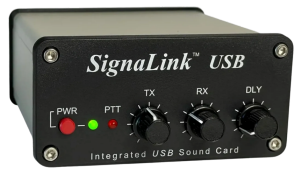
SignaLink USB — sound-card interface
The easy way to connect your computer’s sound-card modem (SoundModem or Dire Wolf) to the radio. No TNC box to buy — this is the cheapest path if you already have a radio.
Photo and product details: Tigertronics ↗

KPC-3+ — hardware TNC
A dedicated packet modem box: low-fuss and rock-solid. This is the modem running my K5NWZ-10 gateway.
Photo and product details: Kantronics ↗

KAM-XL — HF and VHF TNC
Adds the HF bands, for long-distance Winlink with VARA HF when there is no local gateway in range.
Photo and product details: Kantronics ↗
CONNECT BY RADIO
Set it up (over the air)
Once you have a modem, here is how to reach a gateway by radio. These steps use my gateway, K5NWZ-10 on 145.050 MHz; swap in another gateway’s callsign and frequency if you are closer to one.
Winlink Express (Windows)
- Open Winlink Express and enter your callsign and Winlink password under Settings → Winlink Express Setup.
- Next to Open Session, choose Packet Winlink, then click Open Session.
- In the session window, click Settings and choose your modem:
- Hardware TNC: pick KISS, then set the TNC’s COM port and baud rate.
- SoundModem or Dire Wolf: pick KISS over TCP, host 127.0.0.1, using the KISS port set in your modem (SoundModem defaults to 8100, Dire Wolf to 8001).
- Set Connection type: Direct. In the call box, enter the gateway: K5NWZ-10.
- Tune your radio to 145.050 MHz and turn off any tone squelch.
- Write a message, click Post to Outbox, then click Start. Winlink Express connects to the gateway, sends your outbox, picks up any mail waiting for you, and disconnects.
Pat (Linux, Mac, Raspberry Pi)
Set up your modem in Pat’s configuration (AX.25, AGWPE, or a serial TNC), then connect with:
pat connect ax25:///K5NWZ-10Use the variant that matches your setup — for example ax25+agwpe:///K5NWZ-10 for Dire Wolf or SoundModem through AGWPE.
THE MODES
The different modes — how your words actually travel
“Mode” just means the method the radios use to turn your message into sound and back. You do not have to memorize these — your app handles the details — but here is the plain-English version so the menus make sense.
WHAT MY GATEWAY USES
Packet, 1200 baud
The classic VHF mode. Reliable and cheap to get into — any basic TNC or a free sound-card program works. It is slow, so keep messages short. This is what K5NWZ-10 runs on 145.050 MHz.
FASTER ON VHF/UHF
VARA FM
A newer sound-card mode that is much faster than packet on the same 2 m / 70 cm FM radios. It needs the free VARA FM software. Many gateways offer it; mine is packet for now.
LONG DISTANCE
VARA HF
On the shortwave (HF) bands, you can reach gateways hundreds or thousands of miles away with no local gateway at all. Needs an HF radio and VARA HF. This is the backbone of long-haul Winlink.
NO RADIO
Telnet
Straight over the internet, no radio at all. The easy way to learn the software and keep in touch when you do have internet. See the no-radio steps above.
FIND YOUR WAY
Find local repeaters and gateways
New to the area, or just want to know what you can reach? Here is how to look up what is near you.
- Repeaters near you: RepeaterBook is the free, standard directory — a website and a phone app. Filter by your location and band to find local 2 m and 70 cm repeaters, their frequencies, and their tone (CTCSS) settings.
- Northern Colorado clubs and repeaters: I keep a local list on my Clubs & Repeaters page — a friendly starting point for folks around Loveland, Fort Collins, and Greeley.
- Winlink gateways you can reach: in Winlink Express, open Channel Selection and click Update table via Internet. It lists nearby gateways with their frequencies, modes, and distance from you — sorted so the best bets are on top.
- On the air, right now: connect to my LOVE node (or K5NWZ-7) on 145.050 and type RMS to jump straight into the gateway.
MY STATION
My gateway: K5NWZ-10
Winlink approved K5NWZ-10 as a public gateway on November 6, 2026. It runs around the clock on the same Raspberry Pi as my LOVE packet node and the K5NWZ BBS.
| Gateway callsign | K5NWZ-10 |
|---|---|
| Frequency | 145.050 MHz FM |
| Mode | 1200 baud packet (AFSK, AX.25) |
| Location | Loveland, CO — grid DN70LK |
| Hours | 24/7 |
| Station | 50 W, vertical antenna ~20 ft |
| Software | LinBPQ (node LOVE, K5NWZ-7) |
| Sysop | Shawn, K5NWZ |
You can also reach the gateway through my LOVE node: connect to LOVE (or K5NWZ-7) and type RMS.
EMAIL ME FROM ANY ADDRESS
How to email a Winlink user from the regular internet
A Winlink address looks like an email address, but to keep spam off the radio there is one simple rule. For someone on ordinary email to reach a Winlink user, any one of these must be true:
- The Winlink user emailed you first (that automatically puts you on their accepted list), or
- You put //WL2K at the very start of the subject line, or
- The Winlink user added your address to their accept list at winlink.org.
So the easy way to reach me by radio email: just start your subject with //WL2K and send it to my Winlink address. Licensed hams can find my address by looking me up on QRZ.
GOOD TO KNOW
A few things before you get on
- Keep messages small. 1200 baud is slow. Plain text is best — photos and big attachments tie up the channel for everyone.
- Ham radio rules apply. No business traffic, no encryption, and no profanity. Gateway owners can see the messages that pass through their station, so it is not private.
- Cannot reach K5NWZ-10? Other gateways nearby include W0WAL-10 in Windsor. Winlink Express shows the full list under Channel Selection → Update table via Internet.
- Emergency use. Winlink keeps working when cell and internet service are down where you are. That is why ARES and other emergency groups rely on it — practice before you need it.
QUESTIONS?
Get in touch
Send a Winlink message to K5NWZ, or look me up on QRZ for my contact details — licensed hams can see them there. Not licensed yet? Come say hello on our Discord. You can also connect to the LOVE node and leave a message on the K5NWZ BBS. 73!