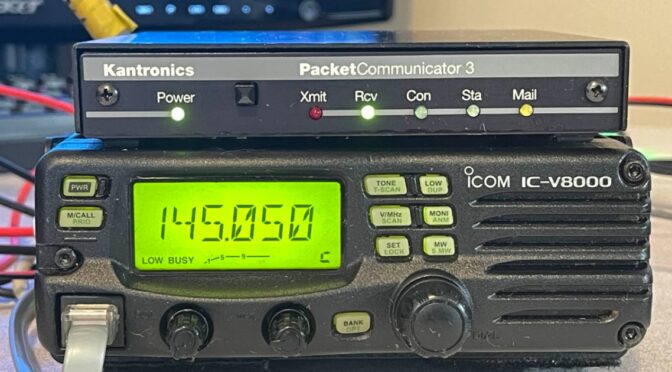
When everything else goes dark, packet is the network that’s left. Will yours still be on the air?
Your node, your digipeater, your BBS — on a normal day they’re a hobby. On the day the phones and internet quit, they’re the only way a written message gets across town. But only if they’re still running. Here’s how to make sure yours is.
The outage nobody plans for is the one that takes the internet with it
Look at the last few weeks: a nationwide FAA ground stop, a classified federal network going dark, back-to-back disruptions at Microsoft, Amazon, Apple and a major bank — while real cyberattacks knocked towns, hospitals and school districts offline. Officials called the big ones “glitches.” Maybe. But whether it’s a hack or a failure, you can’t tell from your shack — and it doesn’t matter. The systems everyone leans on just blink out, with no warning. It’s starting to feel less like if and more like when.
When it happens, people will reach for whatever still works. For text — a list of names, a supply request, a “we’re safe” to family — that’s packet. Keyboard to keyboard, store-and-forward, no towers required. It’s exactly what it was built for.
Here’s the uncomfortable part. A lot of today’s packet network quietly leans on the same things that fail first:
- Grid powerThe node is a radio, a TNC and a computer plugged into the wall. When the power goes, so does the node — and every path that ran through it.
- Internet-linked hopsPlenty of node-to-node and BBS forwarding links ride over the internet now. They look like part of the network right up until the internet disappears.
- Gateways that need the internetMany Winlink gateways hand your mail to the internet to deliver it. With the internet gone, only stations set up for radio-only forwarding keep traffic moving.
- A computer that won’t come back by itselfPower blinks for two seconds. The PC sits at a login screen, or the node software never restarts. Nobody notices for days.
- YouYou might not be home. If the station only works when you’re standing next to it, it isn’t really ready.
The network is only as strong as its weakest node. Make sure it isn’t yours.
Three things keep a node alive
None of this is exotic. It’s the same gear you already run, set up so it doesn’t depend on anything that fails first:
Power that outlasts the grid
A battery the station floats on every day, so an outage is a non-event. Know your draw and your runtime in hours — and how you’ll recharge.
Paths that are pure RF
Know which of your links are radio and which secretly ride the internet. Line up RF forwarding partners and neighbor nodes before you need them.
A station that comes back by itself
Power returns, the computer boots, the node software starts, the BBS is back on frequency — with nobody touching a thing.
Do the math once. A radio sitting on receive, a TNC and a small single-board computer typically draw somewhere around 10–15 watts together — more when transmitting. Measure yours. At that rate, a single 100 Ah battery can carry a quiet node for days, and a modest solar panel can keep it going.
Picture the same outage — two different nodes
⚠ The node that wasn’t ready
The power drops at 2 a.m. The node goes with it. When the lights flicker back the next day, the PC is sitting at a login screen.
The BBS’s forwarding partners were all over the internet, so even once it’s up, mail goes nowhere.
Two towns over, someone tries to connect through it to pass a list of names. Nothing answers.
✓ The node that was
The power drops at 2 a.m. The station doesn’t even notice — it’s been floating on its battery all along.
Its forwarding partners are on RF, so mail keeps moving node to node, no internet involved.
Two towns over, someone connects, drops off their traffic, and it’s on its way. The chain holds.
You already signed up for this. Keeping it on the air is the service.
When we got our licenses, we joined a service with a stated purpose. The very first rule in the FCC’s amateur radio rules, Part 97.1, says the service exists for its value to the public as a voluntary, noncommercial service, “particularly with respect to providing emergency communications.” And the Amateur’s Code a lot of us grew up on says the same thing in plainer words: your station and your skill, always ready to serve your community.
That doesn’t mean you have to volunteer for anything, take a shift, or join a group. Most of us do this because it’s a hobby we love, and that’s exactly how it should be.
Just keeping your node, digipeater or BBS up and running is a community service. When everything else goes quiet, a station that’s simply still there — still on battery, still forwarding over RF, still answering when someone connects — is the help. You don’t have to do anything more than keep it on the air.
A weekend checklist for your node or BBS
Then do the real test: flip the breaker and see what’s still on the air.
Know a SysOp? Send this to them.
The node operator down the road. The BBS everyone forwards through. The club that runs the digipeater on the hill. Every one of them is a link in the same chain — and it only takes one dark node to break it.
Go deeper at K5NWZ.com
Northern Colorado station testing →Find out who can actually hear you — on-air tests and results.
The full preparedness guide →Power, water, heat and comms — for your household, not just your station.
The version for everyone else →The public PSA — send it to the people who’ll come knocking.
Put together by K5NWZ and the Northern Colorado radio community — people who do this for fun, and who’d rather you never need it. Explore the site →